Showing posts with label facebook. Show all posts

Add Facebook like Box in Blogger Blog

 Dear friends,
Social networking sites like facebook, twitter, google plus etc are parts of blogging. And every site has a way to link with your blog site. However, the above sites provide custom follow or like boxes which help you in many extent. Like box help you to reach your blog to audience by providing them a way to keep in touch.It also helps to grow your traffic as traffic is one of the main objectives for a blogger.


When you start your Facebook page you ask your friends and family members to like it and after that it all depends upon the content you write. If people like your content they will voluntary like your Facebook page. But still you need to provide them with an easy method of doing this. Facebook like box allows your visitors to join you easily and they don't have to find you manually. Facebook developers have made this thing very easy to integrate a Facebook like box in to your Blog by adding a few lines of code in it. No let us take a look at the steps you need to follow.


Steps to add Facebook like Box


  • This process includes the editing of your Blog's template, so it is recommended to take a backup of your Blog. First click on the template from your Blogger Dashboard. Then click on Backup/Restore and download the template from the pop-up window.
  • Now that you have taken the backup, you are ready for the process. Visit the Facebook Developers.
  • You will see a window like the one shown below.


  • Customize the look and feel, height, width of your Like box from this window.
  • Uncheck the show stream if you don't want the latest posts with this widget.
  • Uncheck the header checkbox if you don't want to display "Find us on Facebook".
  • Once you are done with the customization, click on Get code. It would pop-up a window like the one shown below.


  • Click on Edit template from the Blogger dashboard. Copy the code 1 from the above window and paste it just after the <body> tag.
  • Now save the template and click the Layout button.
  • Click on add a gadget from your sidebar. Add HTML/JavaScript gadget and Paste the code 2 in it.
  • Now you are done. Save the arrangement and click on View Blog.

HOW TO MAKE SINGLE OR ONE WORD NAME ON FACEBOOK


Want to produce an amazing and also eye-catching profile with one word Facebook name, you can very easily do it with these awesome tips provided below:
  • First login to your Facebook account which you want to change.
  • Now go to your browser network setting. There are lots of browsers but I will recommend you to use Firefox for this purpose. In Mozila Firefox go to Tools> Options > Advanced > Network > Settings. You will find out this option bar from the top of your browser.
  • Now select manual proxy and put “119.235.16.41″ in the proxy address and “8080″ in the port address. And make sure to check the box said, “use this proxy server for all protocols”. You should be logged in to your account before changing proxy. Because sometime you may can’t login to your account.  Please note that, this is not a specified proxy. You can use any others as you wish but the proxy should be Indonesian. You can get many proxies from here Indonesia Proxies. This is the main process to have a Facebook without last name. For more check out the screenshot from below:

         
  • Now change the language of your Facebook account to “Bahasa Indonesia”. For that click Gear Icon > Account Settings > Languages. After changing save the setting.


  • Now click on the Name setting from the account settings page. Then just remove the last name and save name with your password. Make you sure that, in this way you can only use the first name as your full name. So, if you want a different name from your full name, first change the first and last name and keep your selected name in the first name section. Now in this method, delete the last name and make one word Facebook name. At the last save and enjoy this feature of Facebook without last name.


Schedule Facebook Updates

Facebook, A major social networking site which has attracted almost all the Internet users and so much addictive that we always forget to have our snacks, finish our works etc.. So we always schedule ourselves to manage the time properly and hence finish our work completely !


The most important activity any Facebook user does is updating his/her Facebook status. In order to manage time you must also schedule yourself while using Facebook,  So placing a timer besides you and then staying on Facebook doesn’t work all the time. So I have found few online tools,applications and tricks to schedule your Facebook status update while you are busy working or sleeping icon wink 10 ways to schedule Facebook status updates .

LaterBro

With LaterBro you can schedule Facebook status updates, while simultaneously updating Twitter. The service is as bare bones as it gets, simply allowing you to schedule updates. The disadvantage to using LaterBro is that status updates are limited to 140 characters, even though Facebook status updates do allow you 420 characters per update. While you can’t add images to your updates, you can include links, and LaterBro has a native url shortener. Updates can be scheduled every fifteen minutes, and you can also schedule certain updates to be repeated on a daily, weekly, monthly or even yearly basis


All scheduled updates are visible in your account, and you can delete them before hand individually or in bulk.
The status updates on Facebook will feature a link to LaterBro.


Hootsuite

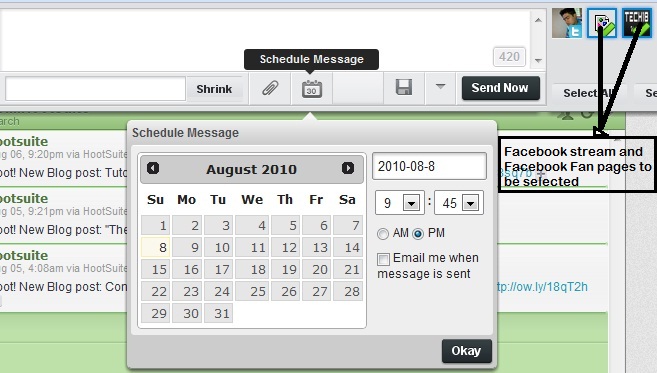
Hootsuite is a web based Twitter application, which is used to post tweets as well as Facebook status updates to your profile as well as the facebook fan pages. These updates can be scheduled easily and very quickly. Below is the screenshot of the Hootsuite application to make you understand its working.


How to show profile picture of friends as emotion in Facebook chat


Today I'm going to share the trick by which you can show profile picture of friends as emotion in Facebook chat. I'm sure you will be loving it.......

How to do this trick

It’s simple just while chatting with your friends enter

[[your friend's id]]

Now how to find your friend’s id

Visit your friend’s profile then you will see like this


Now in this case friends’s id will be 100003298748858 so you have to enter [[100003298748858]] in chat. Or else if you see like this.


then in this case you have to enter [[sumanacharya]] while chatting.
Now enjoy showing your friends profile picture as emotions in Facebook.

Facebook Mass Friend Request Acceptor Code - Facebook Javascript Codes


As you all know since facebook has launched there have been several attempts to reduce the task online by building JavaScript codes that do automated Fan page, Group invitation etc.

Facebook Unfriend Finder Script , Add-Ons and Plugins - Who Deleted me on Fb


Do you want to know Who Unfriend You On Facebook? And if you want to know the reason behind decreasing in your Facebook Friend List. Let’s find out who ditched you from their Facebook Account. Facebook users who are depressed about their loosing friends and have concern that the social network is not providing them anoption to see who has unfriended them on Facebook Friends List now there is solution available for them. There is a Free Facebook Unfriend Finder Script Available online which provides you can option to watch and see who has unfriended you on Facebook.

Schedule Facebook Messages

sendible 20 Facebook Tips/Tricks You Might Not Know
Friends, Today I'm going to share an amazing tip with you by which you would be able to schedule your facebook messages to send to your friends on the time and date you wish. sometimes we need to schedule our message and I think this tip would help you in great extent. 
so, let's start,

How to delete/unfriend more people at once

Facebook is one of the most popular social networking site in the world.In Facebook there are millions of users are making friends, communicating with them sharing thoughts playing games etc. sometimes we need to delete many of more than one friends at once. you can delete friends one by one but this is time consuming. that's why today I'm going to share such a interesting tips by which you can delete more than one friends at once in a easy way.

So if you so many unknown friends on your Facebook Account and want to delete/unfriends all those in one click than follow the given below steps and you are done.

Add dislike button to facebook status


dislike+button


I'm going to share an interesting tip by which you can add a dislike button with your facebook status.
Facebook has a Like option for all updates of us. but using a app in facebook now we can add dislike option for our status too.

Not only dislike button you can add any option, its your wish how you name it.
For doing that just launch the app and follow the instructions..

Schedule Your Facebook Status-How to Schedule fb Status

later+bro


Let me tell you in details, using this trick you will just set date and time on which your status has to get updated on your wall and on that particular time your status will get updated automatically without asking for your permission.

How to Create your own Image Emoticons for facebook


Smileyti.me-Image-Emoticons
Creating your own emotions is easy now. Just follow the steps:

1. Just visit there website http://smileyti.me/
2. Now you will see page asking you to choose your image and than entering that irritating captcha you can follow below .gif image we created uploading our default website logo.

Add Facebook Like Box at The Bottom Of Posts


imageFacebook like box is a great plugin that lets Facebook users to indirectly subscribe to your blog updates via their Facebook accounts. Your website visitors will receive your blog updates on their Facebook Homepage. Before you add the Facebook like box below blogger posts or on any part of your blog, you will need to create a Facebook Like Page by reading this tutorial,
You can see this box appearing below all my posts. This is a better area to place your like box than the sidebar because it is the next thing your readers will see after having read your post. So this area can increase the number of your blog likes. Lets get to work then!


Add Facebook Like Button Below Post Titles

Today I'm going to share How to add Facebook like button below every post title. It's easy just follow the instructions:
  1.  Go To Blogger > Design > Edit HTML
  2. Backup your template
  3. Click the "Expand Widgets Templates" Box
  4. Search for this,

Some Attractive FB Cover Photos

I'm going to Share some most attractive facebook Cover photos:

 I am the Ninja


How to add Animated Pictures in Facebook


This is not about Instant Messaging, Its about Animated Pictures in YourFacebook Status Message. Officially, Facebook Status didn’t support  Animated Pictures in Status Message, only in Chat Service Facebook had Facebook Chat Emoticons.
 But don’t worry, by using Facebook App (Application) that built unofficial you can use Emoticon Animation (gif) in your Facebook Status
You can also add you own uploaded Animated gif image in facebook ...


How to Get Someones IP Address via Facebook

Today i am going to post the trick for getting someone’s Ip through Facebook.
Step 1 – First invite or ping that person for a chat on facebook .
Step 2 – Make sure your all other tabs in browser and other services in computer are closed. If Possible for you then delete all the cookies-cache and browsing history from your browser.
Step 3 – While chatting on Facebook go to Start >- Run >- cmd .
Step 4 – After Opening command Prompt Type  netstat -an command and hit Enter.
Step 5 – Now you will get Ip Address of all the established connections there


Step 6 – Note all the suspicious Ip’s and trace user using ip address tracer sites like whatismyip or ipmango.com .
Thats It !
You can use same trick for tracing ip of someone’s on Skype, gtalk and Yahoo Messenger


How to rename facebook group name


Administrators of Facebook groups have the ability to change the name of the group.For Change the name of your facebook Group it is Compulsory that your Group members should be less then 250.
If the members are more then 250 then you have to Delete some members of your group.
Once the group name is changed, all members of the group receive notification. Correct spelling mistakes or make the group more identifiable by changing the name on Facebook.

How To Post A Video on Facebook :: With Image Snapshots

Want to share videos on Facebook? But don’t know how to do? You’re not alone then. Many people are often searching Google about the ways you may post a video on FB. In this simple Facebook Trick, you’ll get five working steps.


How to Get More Likes on FB - 5 Simple Tricks To Get More Facebook Likes

Many of the Facebook users (Marketers) act like mad to get some quick ‘likes’ in their FanPages. After doing much research on this subject matter, we came to a conclusion that, it is really difficult to get ‘likes’ in our pages if we avoid or skip the effective methods. Below, there are five simple facebook tricks whose proper use will result in more likes in your Facebook Page.

How to Create Dynamic Facebook Page Tabs, Welcome Pages and Landing Page

Facebook Fan Pages and Facebook Brand Pages administrators can Create Dynamic and Professional Custom Facebook Page Tabs in just One Click.Facebook itself is providing Static FBML/HTML features to create Welcome Pages and Custom Page Tabs for Facebook Page Users. But today we are going to share How Facebook Page Administrators can Create Custom Facebook Page Tabs in Easy Way. A free Facebook Application called PageTabApp is now providing all-in-onefeatures to its users to create dynamic and custom Facebook Page tabs with just single click.


Facebook PageTabApp Application brings various features like syncing WordPress articles or posts within Facebook Page Tabs, Providing features to develop custom Facebook Page Tabs with HTML coding etc. Users just have to use the webpage editor to create the design and content that you want to display on yourFacebook Fan Pages, including using images, videos and audios to make your page more lively and attractive! It's so simple that if you know how to use a computer, PageTab is a piece of cake for you. This cool app allows you to easily create aprofessional looking landing page that can be added to your Facebook Fan Page without any technical skill at FREE of cost.